
Kia Stinger CK: Smart cruise control with stop & go system / Speed setting (Smart cruise control system)
Contents:
- To set Smart Cruise Control Speed
- To increase cruise control set speed
- To decrease the cruise control set speed
- To temporarily accelerate with the cruise control on:
- Smart cruise control system will be temporarily canceled when:
- To resume cruise control set speed
- To turn cruise control off
To set Smart Cruise Control Speed
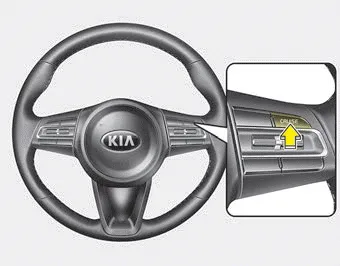
1. Press the CRUISE button, to turn the system on. The CRUISE indicator in the instrument cluster will illuminate.
2. Accelerate to the desired speed.
- 30 km/h (20 mph) ~ 200 km/h (120 mph) : when there is no vehicle in front
- 0 km/h (0 mph) ~ 200 km/h (120 mph) : when there is a vehicle in front
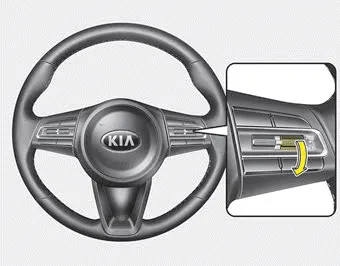
3. Move the lever down (to SET-), and release it at the desired speed. The set speed and vehicle to vehicle distance on the LCD screen will illuminate.
4. Release the accelerator pedal. The desired speed will automatically be maintained.
If there is a vehicle in front of you, the speed may decrease to maintain the distance to the vehicle ahead.
On a steep grade, the vehicle may slow down or speed up slightly while going uphill or downhill.
Vehicle speed may decrease on an upward slope and increase on a ownward slope.
The speed will be set to 30km/h when there is a vehicle ahead and your vehicle speed is 0~30km/h.
To increase cruise control set speed
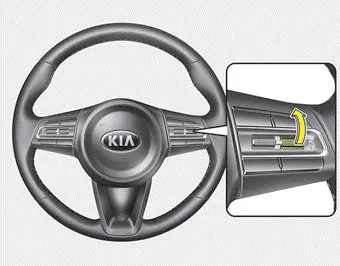
Follow either of these procedures:
- Move the lever up (to RES+), and hold it. Your vehicle set speed will increase by 10 km/h (5 mph). Release the lever at the speed you want.
- Move the lever up (to RES+), and release it immediately. The cruising speed will increase by 1.0 km/h (1 mph) each time you move the lever up (to RES+) in this manner.
- Smart cruise control system will operate to a maximum setting of 200 km/h (120 mph). However all local speed limit laws must be followed.
To decrease the cruise control set speed
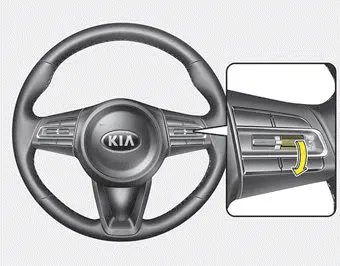
Follow either of these procedures:
- Move the lever down (to SET-), and hold it. Your vehicle set speed will decrease by 10 km/h (5 mph). Release the lever at the speed you want.
- Move the lever down (to SET-), and release it immediately. The cruising speed will decrease by 1.0 km/h (1 mph) each time you move the lever down (to SET-) in this manner.
- You can set the cruise control to above 30 km/h (20 mph).
To temporarily accelerate with the cruise control on:
If you want to speed up temporarily when the cruise control is on, depress the accelerator pedal. Increased speed will not interfere with cruise control operation or change the set speed.
To return to the set speed, take your foot off the accelerator.
If you move the lever down (to SET-) at increased speed, the cruising speed will be set again.
NOTICE
Be careful when accelerating temporarily, because the speed is not regulated automatically at this time even if there is a vehicle in front of you.
Smart cruise control system will be temporarily canceled when: ➤
To resume cruise control set speed
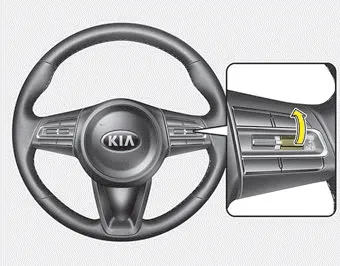
If any method other than the CRUISE button was used to cancel cruising speed and the system is still activated, the cruising speed will automatically resume when you move the lever up/down (to RES+ or SET-).
If you move the lever up (to RES+), the speed will resume to the recently set speed. It will only resume below approximately 30 km/h (20 mph) when a vehicle is in the front.
WARNING - Following Distance
- To avoid collisions, always be aware of the selected speed and vehicle to vehicle distance settings when activating your smart cruise control system.
- Always maintain sufficient braking distance and decelerate your vehicle by applying the brakes if necessary.
To turn cruise control off
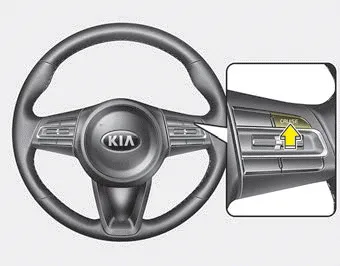
Press the CRUISE button. (the CRUISE indicator in the instrument cluster will go off).
When the Smart Cruise Control System is not needed, press the [CRUISE] switch and deactivate the system.


Other information:
Kia Stinger (CK) 2018-2023 Owner's Manual: Auto defogging system
Auto defogging reduces the probability of fogging up the inside of the windshield by automatically sensing the moisture of inside the windshield. The auto defogging system operates when the heater or air conditioning is on. The auto defogging system does not work if you push the Air intake control button, Air conditioning button, or Mode selection button with the Auto Defogging system in operation.The Auto Hold maintains the vehicle in a standstill even though the brake pedal is not depressed after the driver brings the vehicle to a complete stop by depressing the brake pedal. 1.Depress the brake pedal, start the engine and then press the Auto Hold button. The white AUTO HOLD indicator will come on indicating the system is in standby.Categories
- Manuals Home
- Kia Stinger Owners Manual
- Kia Stinger Service Manual
- To set Smart Cruise Control Speed
- To increase cruise control set speed
- To decrease the cruise control set speed
- To temporarily accelerate with the cruise control on:
- Smart cruise control system will be temporarily canceled when:
- To resume cruise control set speed
- To turn cruise control off
- New on site
- Most important about car
Contents
