
Kia Stinger CK: Windshield defrosting and defogging / Automatic climate control system
Contents:
To defog inside windshield
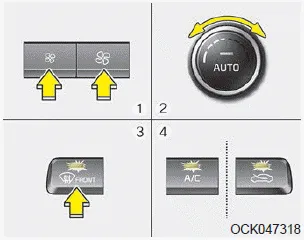
1. Set the fan speed to the desired position.
2. Select desired temperature.
3. Press the defroster button (
 ).
).
4. The outside (fresh) air position will be selected automatically and the air conditioning will turn on according to the detected ambient temperature.
If the air conditioning and outside (fresh) air position are not selected automatically,
adjust the corresponding button manually. If the
 position is selected, lower fan speed
is adjusted to a higher fan speed.
position is selected, lower fan speed
is adjusted to a higher fan speed.
To defrost outside windshield
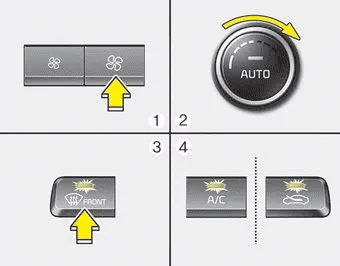
1. Set the fan speed to the highest position.
2. Set the temperature to the extreme hot (HI) position.
3. Press the defroster button (
 ).
).
4. The outside (fresh) air position will be selected automatically and the air conditioning will turn on according to the detected ambient temperature.


Other information:
Kia Stinger (CK) 2018-2023 Owner's Manual: Blind-Spot Collision Warning (BCW) Warning Lamp
Components and components location Components 1. Side repeater lamp 2. BCW Indicator 3. AVM Camera 4. Puddle lamp Repair procedures Removal 1. Disconnect the negative (-) battery terminal. 2. Remove mirror (A) to the direction as shown in the picture using (-) screw driver.Kia Stinger (CK) 2018-2023 Owner's Manual: Crankcase Emission Control System
Schematic diagrams Schematic Diagram Repair procedures Inspection 1. After disconnecting the vapor hose from the PCV valve, remove the PCV valve. 2. Reconnect the PCV valve to the vapor hose. 3. Run the engine at idle, then put a finger over the open end of the PCV valve and make sure that intake manifold vacuum can be felt.Categories
- Manuals Home
- Kia Stinger Owners Manual
- Kia Stinger Service Manual
- New on site
- Most important about car
Contents
