
Kia Stinger CK: Blind-spot Collision Warning (BCW) / BCW (Blind-Spot Collision Warning)
Contents:
Operating conditions
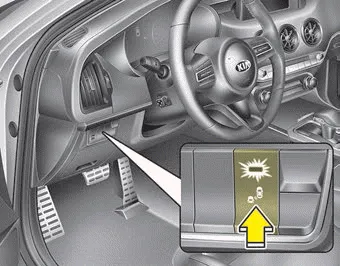
The indicator on the switch will illuminate when the Blind-Spot Collision Warning System (BCW) switch is pressed with the engine start/stop Button ON.
If vehicle speed exceeds 30 km/h (20 mph), the system will activate. If you press the switch again, the switch indicator and system will be turned off.
If the vehicle is turned off, the system will remember the last settings upon restart.
When the system is not used turn the system off by turning off the switch.
When the system is turned on the warning light will illuminate for 3 seconds on the outside rearview mirror.
Warning type
The system will activate when:
1. The system is on.
2. Vehicle speed is above 30 km/h (20 mph).
3. Other vehicles are detected in the rear side.
WARNING
The Blind-Spot Collision Warning System and Rear Cross-Traffic Collision Warning is not a substitute for proper and safe driving procedures. Always drive safely and use caution when changing lanes or backing up. The Blind-Spot Collision Warning system and Rear Cross-Traffic Collision Warning may not detect every object alongside the vehicle.

1st stage
If a vehicle is detected within the boundary of the system, a warning light will illuminate on the outside rearview mirror.
If the detected vehicle is not in detecting range, the warning will turn off.

2nd stage
The second stage alarm will activate when:
1.The first stage alert is on
2.The turn signal is on to change a lane
When the second stage alert is activated, a warning light will blink on the outside rearview mirror and an alarm will sound.
If you move the turn signal switch to the original position, the second stage alert will be deactivated.
- The second stage alarm can be deactivated.
- To activate the alarm: Go to the User Settings Mode → Driver Assistance and select "Blind-Spot Collision Warning Sound" on the LCD display.
- To deactivate the alarm: Go to the User Settings Mode → Driver Assistance and deselect "Blind-Spot Collision Warning Sound" on the LCD display.
✽ NOTICE
The alarm function helps alert the driver. Deactivate this function only when it is necessary.
Detecting sensor
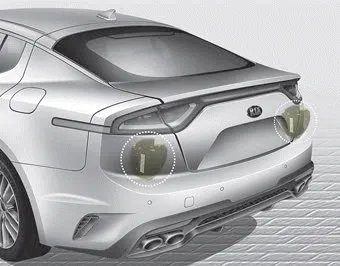
The sensors are located inside of the rear bumper.
Always keep the rear bumper clean for the system to work properly.


Other information:
Kia Stinger (CK) 2018-2023 Owner's Manual: Rear Wheel Guard
Repair procedures Replacement Put on gloves to protect your hands. • Use a plastic panel removal tool to remove interior trim pieces without marring the surface.Kia Stinger (CK) 2018-2023 Owner's Manual: Automatic Transmission System
Components and components location Components 1. Torque converter 2. Electric Oil Pump (EOP) 3. Parking switch (Inhibitor switch) 4. Main connector 5. ATF Warmer Repair procedures Removal 1. Disconnect the negative (-) battery terminal. 2. Remove the stay (A) by loosening the bolts.Categories
- Manuals Home
- Kia Stinger Owners Manual
- Kia Stinger Service Manual
- New on site
- Most important about car
Contents
