
Kia Stinger CK: Smart key / Smart key fu0nctions
Contents:
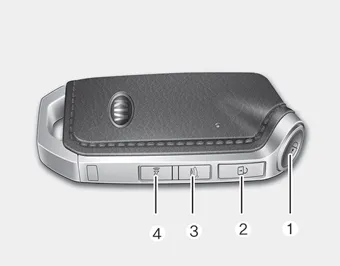
1. Door lock
2. Door unlock
3. Liftgate open
4. Panic alarm
With smart key, you can lock or unlock doors (and liftgate) and start the engine without inserting the key. Refer to the following, for more details.
Locking
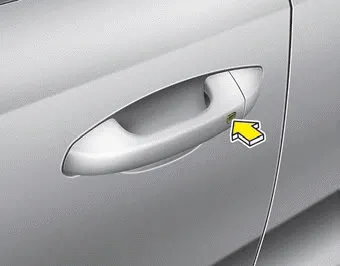
Pressing the button of the front outside door handles with all doors closed and any door unlocked, locks all the doors. The hazard warning lights will blink and the chime will sound once to indicate that all doors are locked. The button will only operate when the smart key is within 0.7 ~ 1 m (28 ~ 40 in.) from the outside door handle. If you want to make sure that a door has locked or not, you should check the door lock button inside the vehicle or pull the outside door handle.
In some instances, when the outside door button is selected, the doors will not lock and an audible chime will sound for 3 seconds if any of the following occurs:
- The smart key is in the vehicle.
- The Engine Start/Stop button is in the ACC or ON position.
- Any door is opened.
Unlocking
Pressing the button of the driver's (or front passenger’s) outside door handle with all doors closed and locked, unlocks the driver's door.
The hazard warning lights will blink twice to indicate that the driver's door is unlocked. Also, the outside rearview mirrors will automatically unfold if the outside rearview mirror folding switch is in the AUTO position.
The button will only operate when the smart key is within 0.7 ~ 1 m (28 ~ 40 in.) from the outside door handle.
When Two press unlock function is activated,
- If you press the driver's outside door handle button, the driver`s door will
unlock.
- If you press the driver's outside door handle button within four seconds again,
then all the doors will unlock.
✽ NOTICE
You can activate or deactivate the Two Press Unlock function. Refer to “User settings” in this chapter.
Liftgate unlocking
If you are within 0.7 ~ 1 m (28 ~ 40 in.) from the outside liftgate handle, with your smart key in possession, the lift gate will unlock and open when you press the liftgate handle switch.
The hazard warning lights will blink twice to indicate that the liftgate is unlocked.
Also, once the liftgate is opened and then closed, the liftgate will lock automatically.
Smart key precautions ➤


Other information:
Kia Stinger (CK) 2018-2023 Owner's Manual: Rear Wheel Speed Sensor
Repair procedures Removal [NON ECS] 1. Remove wheel nuts, wheel and tire (A) from hub. Tightening torque : 107.9 - 127.5 N·m (11.0 - 13.0 kgf·m, 79.6 - 94.0 lb·ft) Be careful not to damage the hub bolts when removing the wheel and tire.Kia Stinger (CK) 2018-2023 Owner's Manual: Engine Room Under Cover
Repair procedures Removal and Installation Engine Room Front Under Cover. 1. Remove the engine room front under cover (A). Tightening torque : 7.8 - 11.8 N·m (0.8 - 1.2 kgf·m, 5.8 - 8.7 lb·ft) 2. Install in the reverse order of removal. Engine Room Rear Under Cover.Categories
- Manuals Home
- Kia Stinger Owners Manual
- Kia Stinger Service Manual
- New on site
- Most important about car
Contents
