
Kia Stinger CK: Features of your vehicle / Windows
Contents:
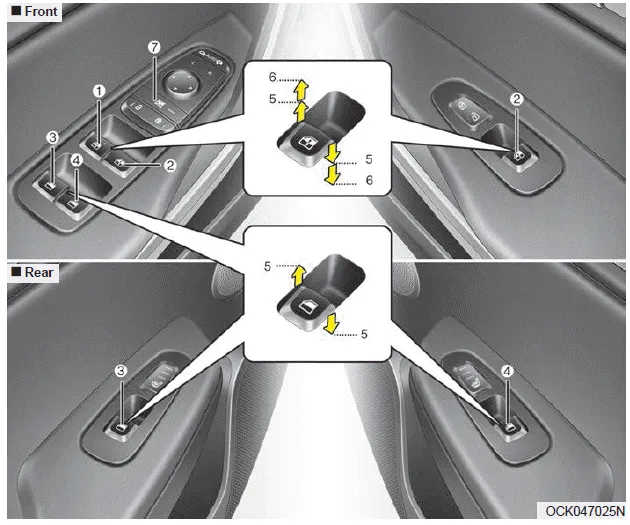
(1) Driver’s door power window switch
(2) Front passenger’s door power window switch
(3) Rear door (left) power window switch
(4) Rear door (right) power window switch
(5) Window opening and closing
(6) Automatic power window up/down (Driver's and Passenger's window)
(7) Power window lock button
In cold and wet climates, power windows may not work properly due to freezing conditions.
Power windows
The Engine Start/Stop Button must be in the ON position for power windows to operate.
Each door has a power window switch that controls the door's window. The driver has a power window lock button which can block the operation of rear passenger windows.
The power windows can be operated for approximately 30 seconds after the engine start/stop button is set to the ACC or LOCK position.
However, if the front doors are opened, the power windows cannot be operated even within the 30 seconds period.
The driver’s door has a master power window switch that controls all the windows in the vehicle.
If the window cannot be closed because it is blocked by objects, remove the objects and close the window.
✽ NOTICE
While driving with the rear windows down or with the sunroof (if equipped) in an open (or partially open) position, your vehicle may demonstrate a wind buffeting or pulsation noise. This noise is a normal occurrence and can be reduced or eliminated by taking the following actions. If the noise occurs with one or both of the rear windows down, partially lower both front windows approximately 2.5 cm (1 in.). If you experience the noise with the sunroof open, slightly reduce the size of the sunroof opening.
CAUTION
Do not install any accessories in the vehicle that extend into the open window area. Such objects will impact the proper function of the Automatic reversal “jam protection” feature described in this chapter.


Other information:
Kia Stinger (CK) 2018-2023 Owner's Manual: Driver Airbag (DAB) Module and Clock Spring
Description and operation Description Driver Airbag (DAB) is installed in the steering wheel and electrically connected to SRSCM via the clock spring. It protects the driver by deploying the airbag when frontal crash occurs. The SRSCM determines deployment of the Driver Airbag (DAB). Never attempt to measure the circuit resistance of the airbag module (squib) even if you are using the specified tester.Components and components location Components 1. Oil cooler tube 2. Oil cooler pipe 3. Oil cooler valve 4. Oil cooler Repair procedures Replacement Oil cooler 1. Remove the front bumper. (Refer to Body - "Front Bumper Aseembly") 2. Remove the air intake shield (A).Categories
- Manuals Home
- Kia Stinger Owners Manual
- Kia Stinger Service Manual
- New on site
- Most important about car
Contents
