
Kia Stinger CK: Features of your vehicle / Storage compartments
These compartments can be used to store small items required by the driver or passengers.
- To avoid possible theft, do not leave valuables in the storage compartment.
- Always keep the storage compartment covers closed while driving. Do not attempt to place so many items in the storage compartment that the storage compartment cover can not close securely.
WARNING - Flammable materials
Do not store, propane cylinders or other flammable/explosive materials in the vehicle. These items may catch fire and/or explode if the vehicle is exposed to hot temperatures for extended periods.
Center console storage
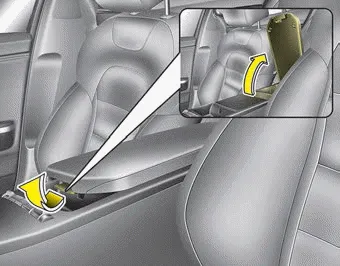
To open the center console storage, pull up the lever.
Glove box
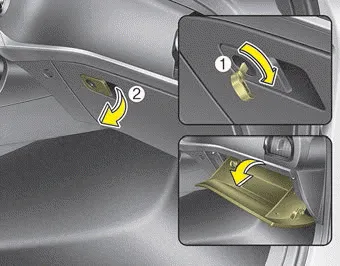
The glove box can be locked and unlocked with a master key (1). (if equipped)
To open the glove box, pull the lever (2) and the glove box will automatically open. Close the glove box after use.
WARNING - Glove Box
To reduce the risk of injury in an accident or sudden stop, always keep the glove box door closed while driving.
✽ NOTICE
If the temperature control knob is in the warm or hot position, warm or hot air will flow into the glove box.
Sunglass holder
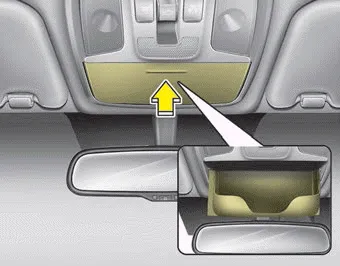
To open the sunglass holder, press the cover and the holder will slowly open. Place your sunglasses with the lenses facing out.
To close the sunglass holder push it up.
WARNING - Sunglass holder
Do not keep objects except sunglasses inside the sunglass holder. Heavier objects can be thrown from the holder in the event of a sudden stop or an accident, possibly injuring the passengers.


Other information:
Kia Stinger (CK) 2018-2023 Owner's Manual: Automatic transmission operation
The automatic transmission has 8 forward speeds and one reverse speed. The individual speeds are selected automatically in the D (Drive) position. WARNING To reduce the risk of serious injury or death: ALWAYS check the surrounding areas near your vehicle for people, especially children, before shifting a vehicle into D (Drive) or R (Reverse).Kia Stinger (CK) 2018-2023 Owner's Manual: Integrated HomeLink® Wireless Control System
The HomeLink® Wireless Control System provides a convenient way to replace up to three hand-held radiofrequency (RF) transmitters with a single built-in device. This innovative feature will learn the radio frequency codes of most current transmitters to operate devices such as gate operators, garage door openers, entry door locks, security systems, even home lighting.Categories
- Manuals Home
- Kia Stinger Owners Manual
- Kia Stinger Service Manual
- New on site
- Most important about car
