
Kia Stinger CK: Driving your vehicle / Driver Attention Warning (DAW)
Kia Stinger (CK) 2018-2023 Owner's Manual / Driving your vehicle / Driver Attention Warning (DAW)
Contents:
The Driver Attention Warning (DAW) system is designed to warn the driver of potentially hazardous driving situations if it detects inattentive driving practices.
System setting and activation ➤
Resetting the system, System disabled
Resetting the system
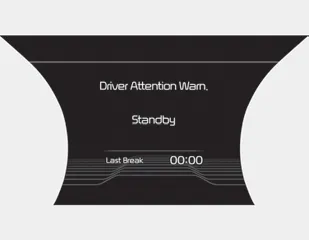
- The last break time is set to 00:00 and the driver's attention level is set to 5 (very attentive) when the driver resets the Driver Attention Warning system.
- The driver attention warning system resets in the following situations.
- The engine is turned OFF.
- The driver unfastens the seat belt and then opens the driver’s door.
- The driver takes a break from driving that lasts more than 10 minutes. - The driver attention warning system operates again, when the driver restarts driving.
System disabled
The Driver Attention Warning system enters the ready status and displays the 'Disabled' screen in the following situations.
- The camera sensor is unable to detect the lanes.
- Driving speed remains under 60 km/h (37 mph) or over 180 km/h (112 mph).
System malfunction ➤


Other information:
Kia Stinger (CK) 2018-2023 Owner's Manual: Front Pillar Trim
Components and components location Component Location 1. Front pillar trim Repair procedures Replacement Put on gloves to protect your hands. • Use a plastic panel removal tool to remove interior trim pieces without marring the surface.Kia Stinger (CK) 2018-2023 Owner's Manual: Automatic Transmission Control System
Description and operation Description Automatic transmission control system relies on various measurements to determine the current control status and determine the necessary compensation values. These values are used to control the actuators and achieve the desired control output. Control System Composition Shift By Wire (SBW) System Composition ▶ Operating Principle – Instead of cable, the system uses electronic signals to shift between the P-R-N-D gears.Categories
- Manuals Home
- Kia Stinger Owners Manual
- Kia Stinger Service Manual
- New on site
- Most important about car
Contents

Copyright © 2026 www.kstinger.com 0.0083