
Kia Stinger CK: Smart cruise control with stop & go system / Limitations of the system
Kia Stinger (CK) 2018-2023 Owner's Manual / Driving your vehicle / Smart cruise control with stop & go system / Limitations of the system
Contents:
The smart cruise control system may have limits to its ability to detect distance to the vehicle ahead due to road and traffic conditions.
On curves

- On curves, the smart cruise control system may not immediately detect a moving vehicle in your lane, and then your vehicle could accelerate to the set speed. Also, the vehicle speed will rapidly slow down when the vehicle ahead is recognized suddenly.
- Select the appropriate set speed on curves and adjust your vehicle speed by depressing the accelerator or brake pedal according to the road and driving conditions ahead.
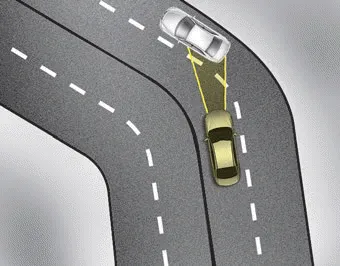
- Your vehicle speed can be reduced due to a vehicle in the adjacent lane. Adjust your vehicle speed by depressing the brake pedal according to the road and driving conditions ahead. Apply the accelerator pedal and select the appropriate set speed. Check to be sure that the road conditions permit safe operation of the smart cruise control system.
On inclines

- During uphill or downhill driving, the smart cruise control system may not immediately detect a moving vehicle in your lane, and may cause your vehicle to accelerate to the set speed. Also, the vehicle speed will rapidly slow down when the vehicle ahead is recognized suddenly.
- Select the appropriate set speed on inclines and adjust your vehicle speed by depressing the accelerator or brake pedal according to the road condition ahead.
Lane changing
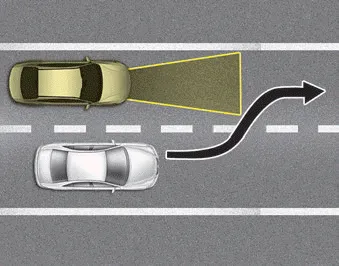
- A vehicle which moves into your lane from an adjacent lane cannot be recognized by the sensor until it is in the sensor's detection range.
- The sensor may not detect immediately when a vehicle cuts in suddenly. Always pay attention to the traffic, road and driving conditions.
- If a vehicle which moves into your lane is slower than your vehicle, your speed may decrease to maintain the distance to the vehicle ahead.
- If a vehicle which moves into your lane is faster than your vehicle, your vehicle will accelerate to the selected speed.
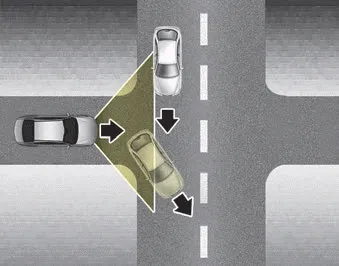
- Your vehicle may accelerate when a vehicle ahead of you disappears.
- When you are warned that the vehicle ahead of you is not detected, drive with caution.
Vehicle recognition ➤


Other information:
Kia Stinger (CK) 2018-2023 Owner's Manual: Front Door Side Weatherstrip
Repair procedures Replacement 1. Loosen the front door checker (A) mounting bolt. Tightening torque : 19.6 - 29.4 N·m (2.0 - 3.0 Kgf·m, 14.5 - 21.7 lb·ft) 2. Detach the clips, then remove the front door side weatherstrip (A). Tightening torque : 19.Kia Stinger (CK) 2018-2023 Owner's Manual: Front Bumper Assembly
Components and components location Component Location 1. Front bumper cover Repair procedures Replacement Put on gloves to protect your hands. • Use a plastic panel removal tool to remove interior trim pieces without marring the surface.Categories
- Manuals Home
- Kia Stinger Owners Manual
- Kia Stinger Service Manual
- New on site
- Most important about car
Contents

Copyright © 2026 www.kstinger.com 0.0139