
Kia Stinger CK: Door locks / Operating door locks from inside the vehicle
Contents:
With the door lock button
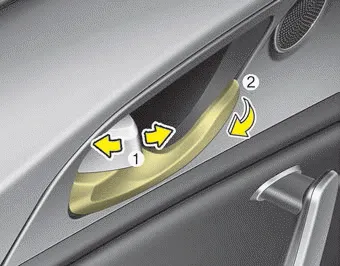
- To unlock a door, push the door lock button (1) to the “Unlock” position. The red mark on the handle will be visible.
- To lock a door, push the door lock button (1) to the “Lock” position. If the door is locked properly, the red mark on the handle will not be visible.
- To open a door, pull the door handle (2) outward.
- If the inner door handle of the driver’s (or front passenger’s) door is pulled when the door lock button is in the lock position, the button will unlock and the door will open. (if equipped)
- Front doors cannot be locked if the smart key is in the vehicle and any front door is opened.
- Doors cannot be locked if the smart key is in the vehicle and a door is open.
WARNING
Do not pull the inner door handle while the vehicle is moving.
If a power door lock ever fails to function while you are in the vehicle, try one or more of the following techniques to exit :
- Operate the door unlock feature repeatedly (both electronic and manual) while simultaneously pulling on the door handle.
- Operate the other door locks and handles, front and rear.
- Lower a front window and use the key to unlock the door from outside.
With central door lock switch
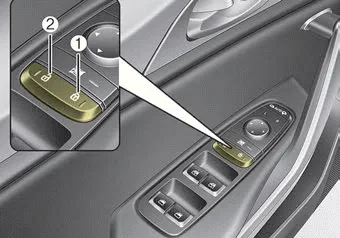
■ Driver side
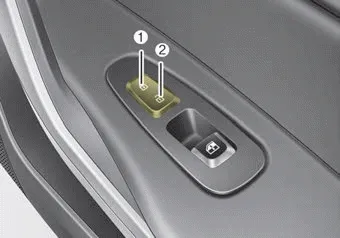
■ Passenger side
Operate by pressing the central door lock switch.
For Driver’s door:
- When pushing down on the right portion (1) of the switch, all vehicle doors will lock.
- When pushing down on left portion (2) of the switch, all vehicle doors will unlock.
For Front Passenger’s door:
- When pushing down on the front portion (1) of the switch, all vehicle doors will lock.
- When pushing down on the rear portion (2) of the switch, all vehicle doors will unlock.
- If the smart key is in the vehicle and any front door is opened, the doors will not lock even though the right portion(1, driver`s door) of the central door lock switch is pressed.
WARNING - Doors
The doors should always be fully closed and locked while the vehicle is in motion to prevent accidental opening of the door.
WARNING - Unattended children/animals
Never leave children or animals unattended in your vehicle. An enclosed vehicle can become extremely hot, causing death or severe injury to unattended children or animals who cannot escape the vehicle.


Other information:
Kia Stinger (CK) 2018-2023 Owner's Manual: AUTO HOLD
The Auto Hold maintains the vehicle in a standstill even though the brake pedal is not depressed after the driver brings the vehicle to a complete stop by depressing the brake pedal. 1.Depress the brake pedal, start the engine and then press the Auto Hold button. The white AUTO HOLD indicator will come on indicating the system is in standby.Kia Stinger (CK) 2018-2023 Owner's Manual: Heated Oxygen Sensor (HO2S)
Specifications Specification HO2S [Bank 1/Sensor 1] Item Specification Heater Resistance (Ω) 2.5 - 4.0 [20°C(68°F)] HO2S [Bank 1/Sensor 2] Item Specification Heater Resistance (Ω) 3.3 - 4.1 [20°C(69.8°F)] Description and operation Description Heated Oxygen Sensor (HO2S), consisting of zirconium and alumina, is installed on both upstream and downstream of the Catalytic Converter to detect the air/fuel ratio and send it to the ECM.Categories
- Manuals Home
- Kia Stinger Owners Manual
- Kia Stinger Service Manual
- New on site
- Most important about car
Contents
