
Kia Stinger CK: Driving your vehicle / Engine start/stop button
Kia Stinger (CK) 2018-2023 Owner's Manual / Driving your vehicle / Engine start/stop button
Contents:
Illuminated engine start/stop button
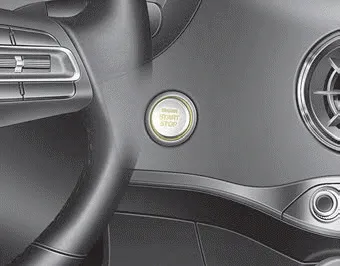
Whenever the front door is opened, the engine start/stop button will illuminate for your convenience. The light will go off after about 30 seconds when the door is closed.
When all doors are closed and you lock the vehicle by using the transmitter or the smart key, the light will go off immediately.
Engine start/stop button position ➤
Starting the engine with a smart key ➤


Other information:
Kia Stinger (CK) 2018-2023 Owner's Manual: Around View Monitor (AVM)
Components and components location Components 1) AVM unit basically transmits data via C-CAN only. • Steering wheel angle sensor : C-CAN • Vehicle speed sensor : C-CAN 2) It functions as a gateway of C-CAN ↔ MM-CAN in cluster.Specifications Specifications Items Specifications Model Radio /MP3 /Bluetooth Power supply DC 14.4 V Parasitic current Max. 1mA (Head unit only) Antenna 80PF 75Ω Tuning type PLL SYNTHESIZED TUNING Components and components location Component Location 1.Categories
- Manuals Home
- Kia Stinger Owners Manual
- Kia Stinger Service Manual
- New on site
- Most important about car
Contents

Copyright © 2026 www.kstinger.com 0.0133