
Kia Stinger CK: LCD windows / LCD Modes
Contents:
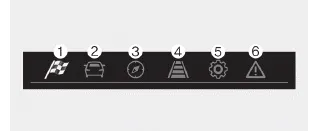
(1) SPORT mode (if equipped)
This mode displays Gauge, Lap Timer, G-Force.
(2) Trip Computer mode
This mode displays driving information such as the tripmeter, fuel economy, and so on.
❈ For more details, refer to “Trip Computer” in this chapter.
(3) Turn by Turn mode (if equipped)
This mode displays the state of the navigation.
(4) LKA/SCC mode (if equipped)
This mode displays the state of the Smart Cruise Control (SCC) and Lane keeping Assist (LKA).
❈ For more details, refer to “Smart Cruise Control (SCC)” and “Lane keeping Assist (LKA)” in chapter 5.
(5) User Settings mode
On this mode, you can change settings of the doors, lamps and so on.
(6) Master warning mode
This mode informs of warning messages related to Low tire pressure or malfunction of Blind-spot Collision Warning and so on.
❈ For controlling the LCD modes, refer to “LCD window Control” in this chapter.
SPORT mode

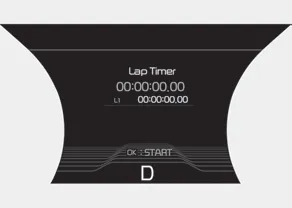

This mode displays Gauge, Lap Timer, G-Force.
Trip computer mode
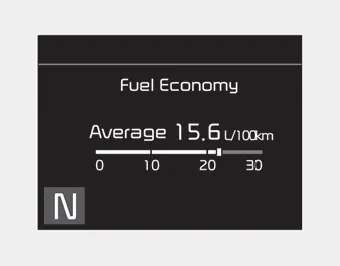
This mode displays driving information like the tripmeter, fuel economy, and so on.
❈ For more details, refer to “Trip Computer” in this chapter.
Turn By Turn Mode
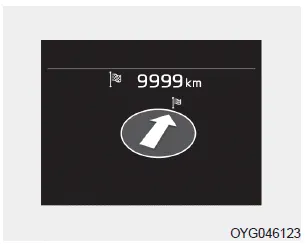
This mode displays the state of the navigation.
SCC with S&G/LKA mode
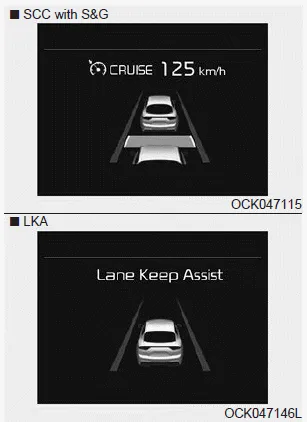
This mode displays the state of the Smart Cruise Control with Stop & Go and Lane Keeping Assist (LKA).
❈ For more details, refer to “Smart Cruise Control with Stop & Go” and “Lane Keeping Assist (LKA)” in chapter 5.
Service mode
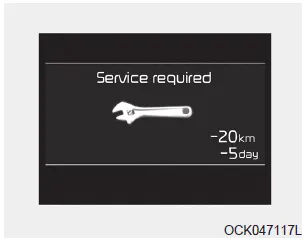
When Service Required is set, the remaining distance/time before service is required appears on the LCD screen.
From the point at which the remaining distance to drive amounts to 1,500 km (900 mi.) or the remaining time amounts to 3 days, the Service Required message automatically displays and remains on the LCD screen for a number of seconds every time the engine start/stop button is ON.
When Service Required is set, a Service Required Alarm message pops up when an aggregated amount of miles/time driven reaches a certain point.
With Service Required mode, press OK button for more than 1 second. The values will return to initial setting values.
❈See User Settings
Mode in this chapter for further information about Service Required Setting.
❈Service Required Setting
If the Battery Cable is disconnected, Fuse Switch is turned OFF, the Service Required Setting values (an amount of miles/time driven) may change. In this situation, re-enter Service Required settings.
Master warning mode

• This warning light informs the driver of the following situations:
- LED head lamp malfunction (if equipped)
- Smart Cruise Control with Stop & Go malfunction (if equipped)
- Forward Collision-Avoidance Assist malfunction (if equipped)
- Blind-Spot Collision Warning radar blind (if equipped)
- Smart Cruise Control with Stop & Go radar blind (if equipped)
- Lamp malfunction
- High Beam Assist malfunction (if equipped)
- Windshield washer fluid low
The Master Warning Light illuminates if one or more of the above warning situations
occur. At this time, the LCD Modes Icon will change from (
 )
to (
)
to (
 ).
).
If the warning situation is solved, the master warning light will be turned off
and the LCD Modes Icon will be changed back to its previous icon (
 ).
).


Other information:
Kia Stinger (CK) 2018-2023 Owner's Manual: Specifications
Service data Service Data Items Specification Hood Type Rear hinged, gas lifter type Front Door Structure Front hinged, full door structure Regulator system Wire drum type Locking system Pin-fork system Rear Door Structure Front hinged, full door structure Regulator system Wire drum type Locking system Pin-fork system Trunk Lid Type Front hinged, power trunk lid type (option ) Seat Belts Front 3-point type with Emergency Locking Retractor (E.Kia Stinger (CK) 2018-2023 Owner's Manual: D Position Solenoid Valve (ON/OFF)
Specifications Specifications Item Specification Control type ON/OFF Control pressure kpa (kgf/cm², psi) 539.36 (5.5, 78.23) Current (mA) 0 - 600 Coil resistance (Ω) 10.5 ± 0.5 Components and components location Components Location 1.Categories
- Manuals Home
- Kia Stinger Owners Manual
- Kia Stinger Service Manual
- New on site
- Most important about car
Contents
