
Kia Stinger CK: Floor Console / Rear Console Cover
Kia Stinger (CK) 2018-2023 Service Manual / Body (Interior and Exterior) / Floor Console / Rear Console Cover
Components and components location
| Component Location |
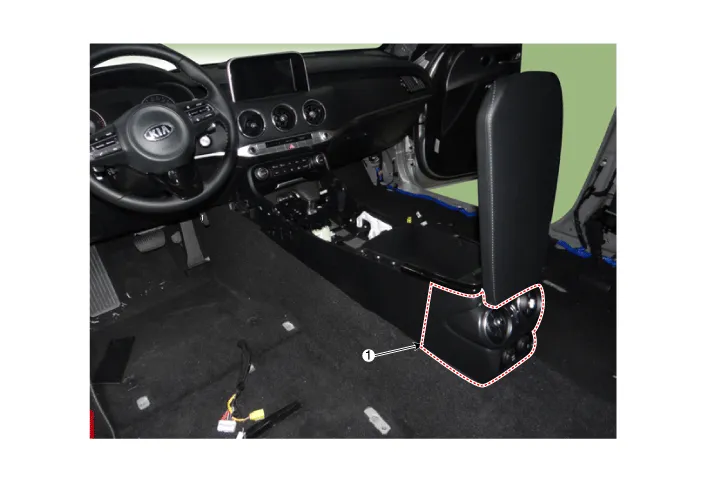
| 1. Rear console cover |
Repair procedures
| Replacement |
Put on gloves to protect your hands. |

|

| 1. |
Remove the console assembly. (Refer to Floor console - "Floor Console Assembly") |
| 2. |
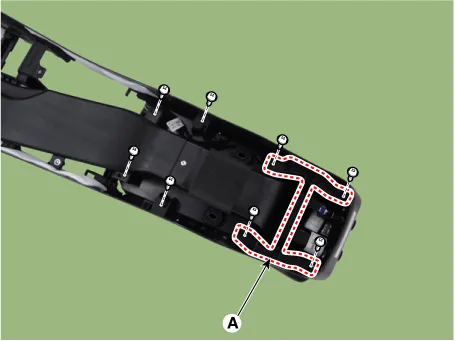
Remove the rear console bracket (A) after loosening the console lower side mounting screws.
|
| 3. |
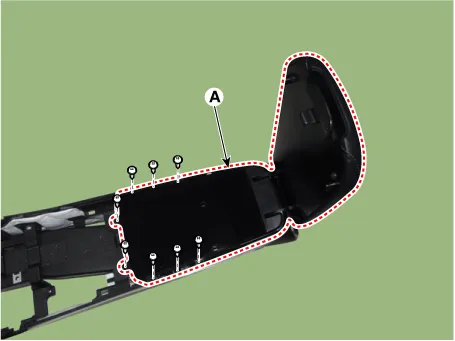
Remove the console storage box & armrest(A) after loosening the mounting screws.
|
| 4. |
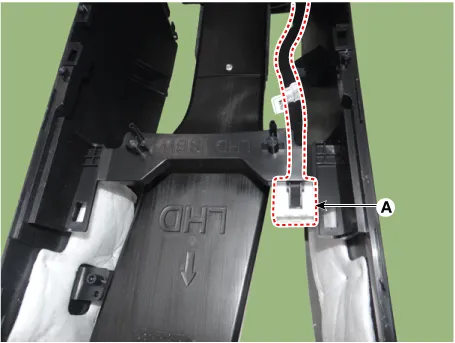
Disconnect the console lower side extension wiring mounting clip (A).
|
| 5. |
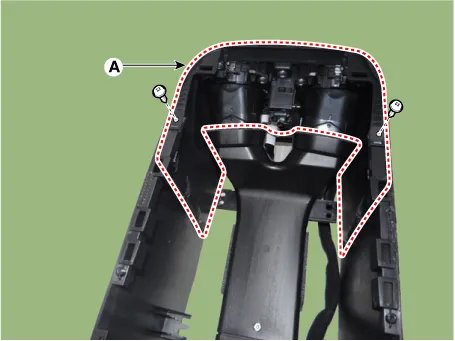
Remove the console rear cover (A) after loosening the mounting screws.
|
| 6. |
Install in the reverse order of removal.
|


Other information:
Schematic diagrams Circuit Diagram Description and operation Description The multimedia jack on the console upper cover is for customers who like to listen to external portable music players like the MP3 etc., through the vehicle's sound system when it is linked to this jack. The customer has this added option.Components and components location Components 1. Brake lamp switch 2. Brake pedal Description and operation Operation Operation principle of inductive non-contact switch 1. Use the high frequency magnetic field and the induced current that are generated by oscillation (to approved voltage) of coil in switch.Categories
- Manuals Home
- Kia Stinger Owners Manual
- Kia Stinger Service Manual
- New on site
- Most important about car

Copyright © 2026 www.kstinger.com 0.0122