
Kia Stinger CK: Automatic Transmission Control System / Shift Lever
Kia Stinger (CK) 2018-2023 Service Manual / Automatic Transmission System / Automatic Transmission Control System / Shift Lever
Components and components location
| Components |
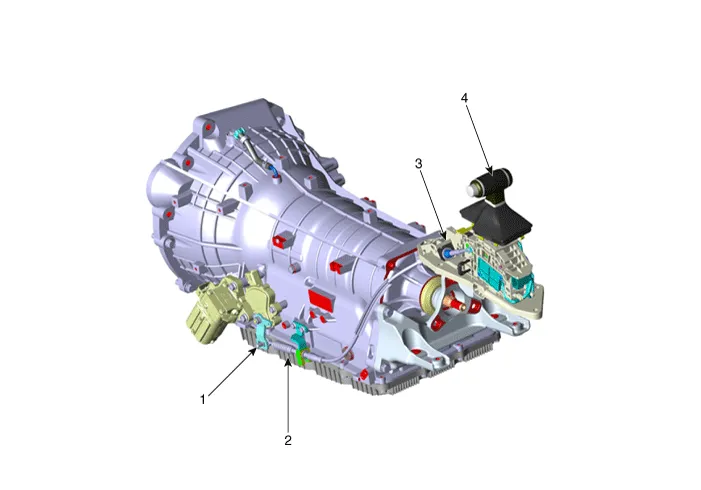
| 1. Manual control lever 2. Shift cable |
3. Shift lever assembly 4. Knob |
Repair procedures
| Removal |
| 1. |
Shift the gear to "N". |
| 2. |
Remove the knob (A) by pulling it in the direction of arrow after removing the boots from the console upper cover.
|

| 3. |
Remove the floor console assembly. (Refer to Body - “Floor Console Assembly”) |
| 4. |
Disconnect the shift lever main connector. |
| 5. |
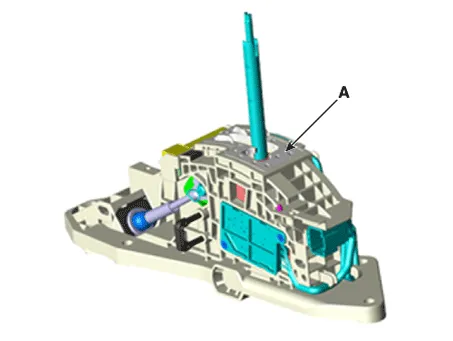
Remove the shift lever (A) after loosening the mounting bolts.
|
| 6. |
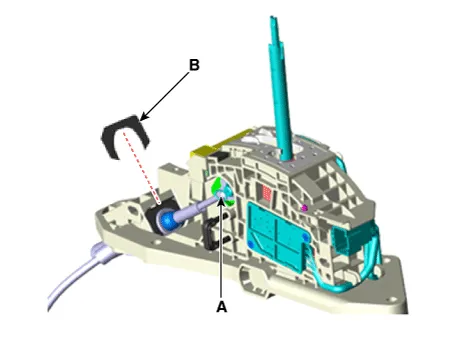
Remove the snap pin (A) and shift cable fixing clip (B).
|
| 7. |
Remove the shift cable from the shift lever after loosening the screws (A).
|

| Installation |
| 1. |
Install in the reverse order of removal. |


Other information:
Kia Stinger (CK) 2018-2023 Service Manual: Front Axle Assembly
Components and components location Components 1. Front brake disc 2. Hub assembly 3. Dust cover 4. Front knuckle Repair procedures Removal [2WD] 1. Remove wheel nuts, front wheel and tire (A) from front hub. Tightening torque: 107.Components and components location Component [THETA Engine] 1. Clutch Bolt 2. Limiter Bolt 3. Limiter & Hub Assembly 4. Snap Ring 5. Pulley 6. Compressor Assembly [LAMBDA Engine] 1. Clutch Bolt 2. Limiter Bolt 3. Limiter & Hub Assembly 4.Categories
- Manuals Home
- Kia Stinger Owners Manual
- Kia Stinger Service Manual
- New on site
- Most important about car

Copyright © 2026 www.kstinger.com 0.0172