
Kia Stinger CK: Around View Monitor (AVM) / Around View Monitor (AVM) Switch
Repair procedures
| Removal |
Put on gloves to protect your hands. |

|

| 1. |
Disconnect the negative (-) battery terminal. |
| 2. |
Remvoe the console upper complete (A) by using a remover.
|
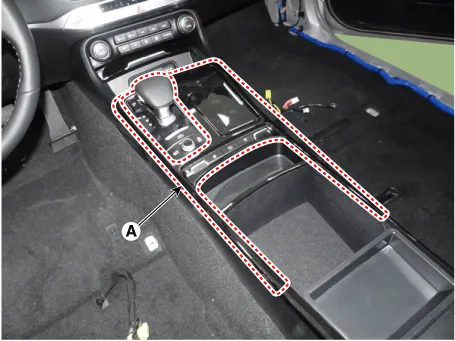
| 3. |
Disconnect the connectors (A) from the console upper complete.
|

| 4. |
Remove the connector (A) from the console floor switch complete.
|
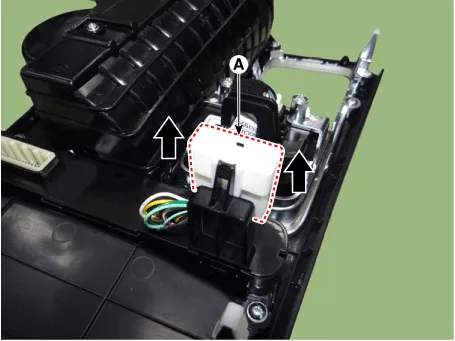
| 5. |
Remove the console floor switch complete (A) after loosening the mounting screws.
|

| Installation |
| 1. |
Install the console floor switch complete. |
| 2. |
Install the connector from the console floor switch complete. |
| 3. |
Connect the connectors from the console upper complete. |
| 4. |
Install the console upper complete. |
| 5. |
Connect the negative (-) battery terminal. |
|


Other information:
Kia Stinger (CK) 2018-2023 Service Manual: Headlamps
Description and operation Description BI-FUNCTION 1. Definition – A headlamp with integrated functions of high and low beam – The light is controlled by rotating the shield inserted to the lens. (A solenoid is adopted.) [Halogen Type] [LED Type] 2.Kia Stinger (CK) 2018-2023 Service Manual: CVVT Oil Temperature Sensor (OTS)
Specifications Specification Temperature [°C (°F)] Resistance (kΩ) -40 52.15 -20 28.82 0 14.08 - 19.45 20 2.16 - 2.78 40 1.11 60 0.Categories
- Manuals Home
- Kia Stinger Owners Manual
- Kia Stinger Service Manual
- New on site
- Most important about car
