
Kia Stinger CK: Around View Monitor (AVM) / Around View Monitor (AVM) Unit
Components and components location
| Components |

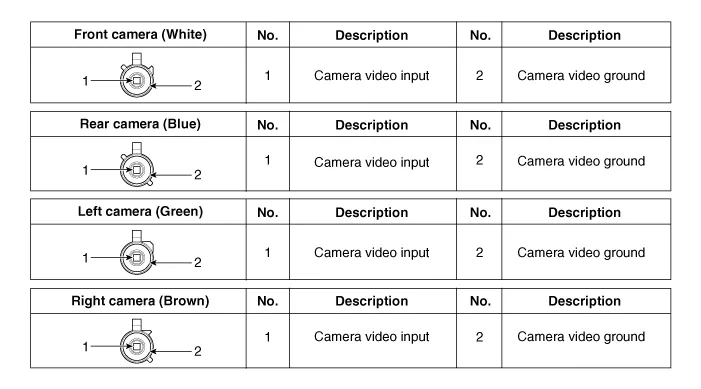
Schematic diagrams
| Circuit Diagram |

Repair procedures
| Removal |
Put on gloves to protect your hands. |

|

| 1. |
Disconnect the negative (-) battery terminal. |
| 2. |
Remove the crash pad lower panel. (Refer to Body - "Crash Pad Lower Panel") |
| 3. |
Remove the knee airbag (KAB) module. (Refer to Restraint - "Knee Airbag (KAB) Module") |
| 4. |
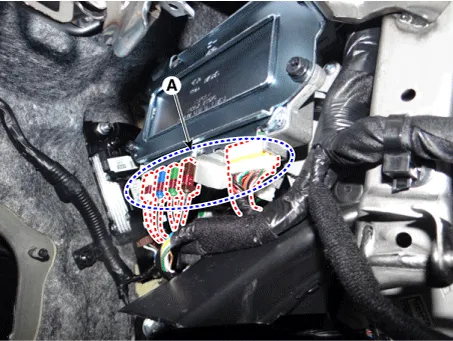
Disconnect the AVM unit connectors (A).
|
| 5. |
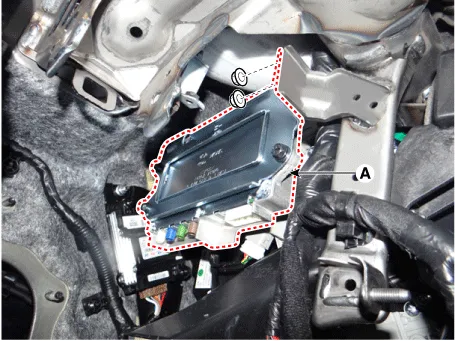
Remove the AVM unit (A) after loosening the mounting nuts.
|
| Installation |
| 1. |
Install the AVM unit. |
| 2. |
Connect the AVM unit connectors. |
| 3. |
Install the knee airbag (KAB) module. |
| 4. |
Install the crash pad lower panel. |
| 5. |
Connect the negative (-) battery terminal. |


Other information:
Kia Stinger (CK) 2018-2023 Service Manual: Center Fascia Panel
Components and components location Component Location 1. Monitor fascia panel Repair procedures Replacement Put on gloves to protect your hands. • Use a plastic panel removal tool to remove interior trim pieces without marring the surface.Components and components location Component Location 1. Front door scuff trim 2. Rear door scuff trim Repair procedures Replacement Put on gloves to protect your hands. • Use a plastic panel removal tool to remove interior trim pieces without marring the surface.Categories
- Manuals Home
- Kia Stinger Owners Manual
- Kia Stinger Service Manual
- New on site
- Most important about car
