
Kia Stinger CK: SRSCM / Side Impact Sensor (SIS)
Description and operation
| Description |
| • |
Side Impact Sensor (SIS) system consists of two Pressure Side Impact Sensor (P-SIS) installed at each center of the front door module (LH and RH), two SIS installed at each center pillar nearby (LH and RH) and two rear SIS installed in the rear pillar (LH and RH). |
| • |
Pressure Side Impact Sensor is also called P-SIS because it detects pressure from collision at its mounting location. |
| • |
Side Impact Sensor is also called A-SIS because it detects acceleration. |
| • |
SRSCM decides deployment of the airbag and the time of deployment through the collision signal of the SIS when the collision occurred. |
Components and components location
| Components |
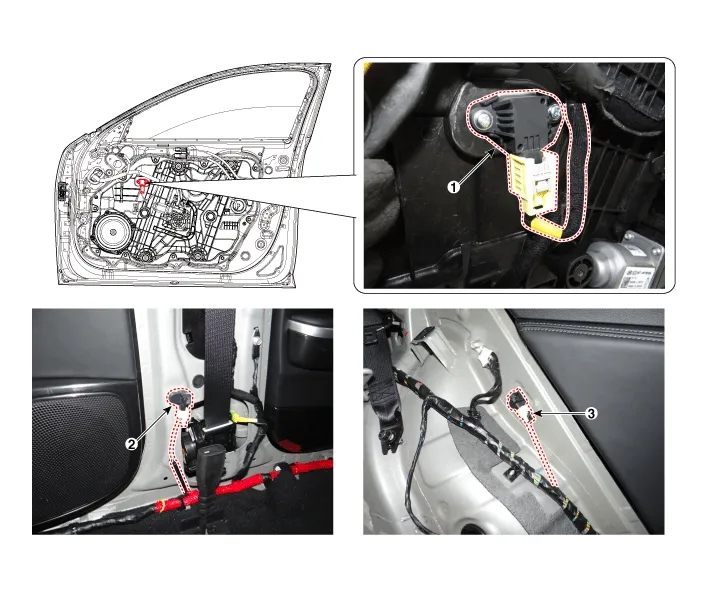
| 1. Front Pressure Side Impact
Sensor (P-SIS) 2. Front Gravity Side Impact Sensor (G-SIS) |
3. Rear side Impact Sensor (R-SIS)
|
Repair procedures
| Removal |
Front Pressure Side Impact Sensor (P-SIS)
| 1. |
Disconnect the negative battery terminal, and wait for at least thirty seconds before beginning to work. |
| 2. |
Remove the front door trim. (Refer to Body (Interior and Exterior) - "Front Door Trim") |
| 3. |
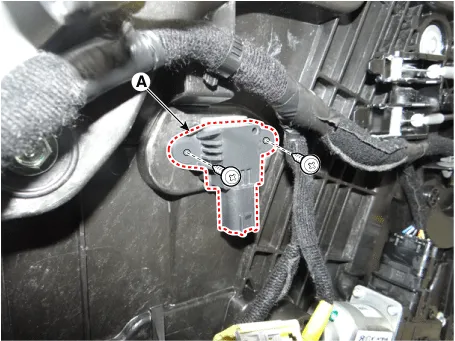
Remove the pressure side impact sensor (A).
|

| 4. |
Loosen the side pressure sensor mounting screw, and remove the sensor (A).
|
Front Gravity Side Impact Sensor (G-SIS)
| 1. |
Disconnect the negative battery terminal, and wait for at least thirty seconds before beginning to work. |
| 2. |
Remove the door scuff trim. (Refer to Body (Interior and Exterior) - "Door Scuff Trim") |
| 3. |
Remove the center pillar trim. (Refer to Body (Interior and Exterior) - "Center Pillar Trim") |
| 4. |
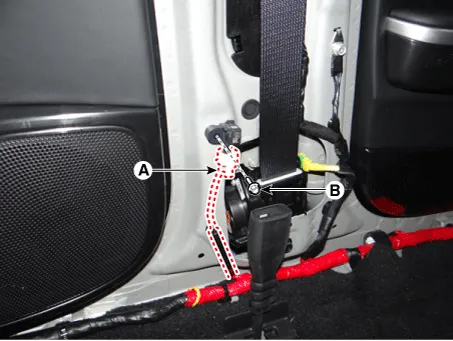
After disconnecting the side impact sensor connector (A) and loosening the bolt (B), remove the sensor.
|
Rear Side Impact Sensor (R-SIS)
| 1. |
Disconnect the negative battery terminal, and wait for at least thirty seconds before beginning to work. |
| 2. |
Remove the rear seat assembly. (Refer to Body (Interior and Exterior) - "Rear Seat Assembly") |
| 3. |
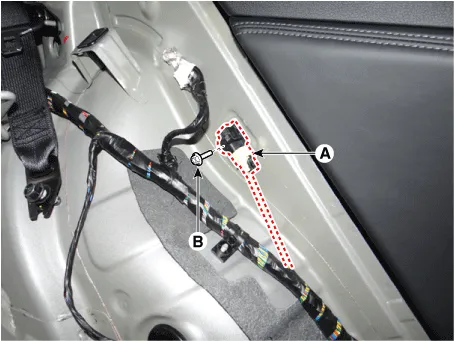
Remove the rear side impact sensor connect (A). |
| 4. |
Loosen the rear side impact sensor nut (B), and remove the sensor.
|
| Installation |
Front Pressure Side Impact Sensor (P-SIS)
| 1. |
Disconnect the negative battery terminal, and wait for at least thirty seconds before beginning to work. |
| 2. |
Install in the reverse order of removal. |
| 3. |
After installing the pressure side impact sensor, confirm proper system operation: • Switch "ON" the ignition. The SRS indicator light should turn on for about six seconds and then off.
|

Front Gravity Side Impact Sensor (G-SIS)
| 1. |
Disconnect the negative battery terminal, and wait for at least thirty seconds before beginning to work. |
| 2. |
Install in the reverse order of removal. |
| 3. |
After installing the side impact sensor, confirm proper system operation: • Switch "ON" the ignition. The SRS indicator light should turn on for about six seconds and then off. |
Rear Side Impact Sensor (R-SIS)
| 1. |
Disconnect the negative battery terminal, and wait for at least thirty seconds before beginning to work. |
| 2. |
Install in the reverse order of removal. |
| 3. |
After installing the side impact sensor, confirm proper system operation: • Switch "ON" the ignition. The SRS indicator light should turn on for about six seconds and then off. |


Other information:
Kia Stinger (CK) 2018-2023 Service Manual: SRS Control Module (SRSCM)
Description and operation Description The primary purpose of the SRSCM (Supplemental Restraints System Control Module) is to discriminate between an event that warrants restraint system deployment and an event that does not. The SRSCM must decide whether to deploy the restraint system or not. After determining that pretensioners and/or airbag deployment is required, the SRSCM must supply sufficient power to the pretensioners and airbag igniters to initiate deployment.Kia Stinger (CK) 2018-2023 Service Manual: Folding the rear seat
The rear seatbacks may be folded to facilitate carrying long items or to increase the luggage capacity of the vehicle. WARNING The purpose of the fold-down rear seatbacks is to allow you to carry longer objects that could not otherwise be accommodated. Never allow passengers to sit on top of the folded down seatback while the car is moving as this is not a proper seating position and no seat belts are available for use.Categories
- Manuals Home
- Kia Stinger Owners Manual
- Kia Stinger Service Manual
- New on site
- Most important about car
