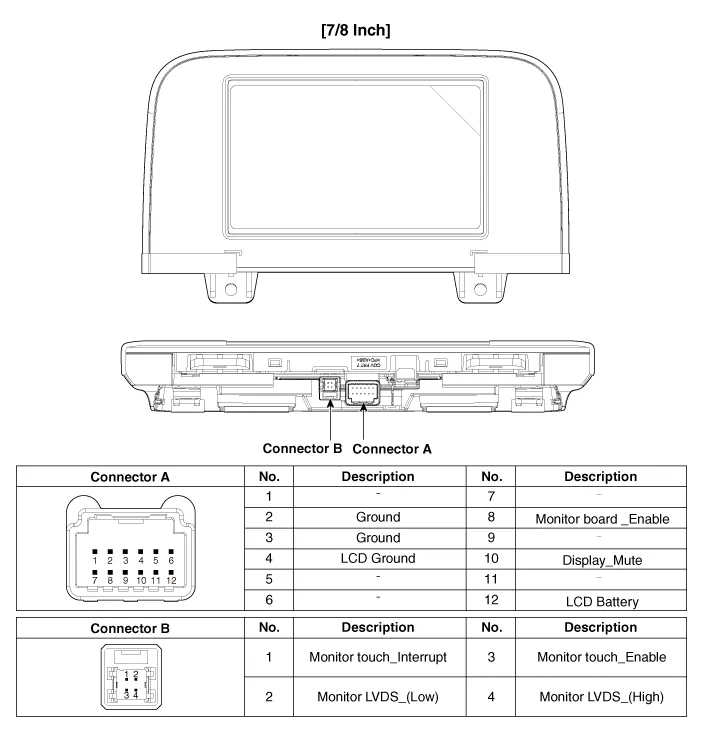
Kia Stinger CK: Audio / Audio Front Monitor

Components and components location
Components

Repair procedures
Removal
  

When removing with a flat-tip screwdriver or remover, wrap protective tape around the tools to prevent damage to components.

When removing the interior trim pieces, use a plastic panel removal tool not to damage the surface.

Be careful to store and handle the crash pad when removing/installing because lubricant and oil can leave a stain on the trim.

1.

Disconnect the negative (-) battery terminal.

2.

Remove the crash pad passenger side panel.

(Refer to Body - "Crash Pad Center Panel")

3.

Remove the audio front monitor (A) after loosening the mounting screws.

4.

Disconnect the audio front monitor connectors (A).

Installation
1.

Connect the audio front monitor connectors.

2.

Install the audio front monitor.

3.

Install the crash pad passenger side panel.

4.

Connect the negative (-) battery terminal.


Make sure that the connectors are connected properly.

Check the audio system.

Other information:

Kia Stinger (CK) 2018-2023 Service Manual: Side Sill Molding

Repair procedures Replacement    Put on gloves to protect your hands.    • Use a plastic panel removal tool to remove interior trim pieces without marring the surface.

Kia Stinger (CK) 2018-2023 Service Manual: Headlamp Leveling Switch (Manual)

Schematic diagrams Circuit Diagram Repair procedures Removal 1. Disconnect the negative (-) battery terminal. 2. Remove the crash pad lower panel. (Refer to Body - "Crash Pad Lower Panel") 3. Remove the crash pad garnish [LH] (A) after loosening the mounting screw.

Categories

 
Copyright © 2026 www.kstinger.com 0.0129