
Kia Stinger CK: Heater / Auto Defoging Actuator
Description and operation
| Description |
Installed on the windshield glass, the auto defogging sensor judges and sends signal to blow out wind for defogging if moisture occurs. The air conditioner control module receives a signal from the sensor and restrains moisture and eliminates defog by the intake actuator, A/C, auto defogging actuator, blower motor rpm and mode actuator.
Repair procedures
| Inspection |
| 1. |
Turn the ignition switch OFF. |
| 2. |
Disconnect the auto defogging connector. |
| 3. |
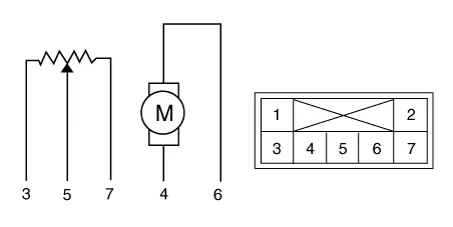
Verify that the auto defogging actuator operates in the open position when connecting 12V to terminal 4 and grounding terminal 6. Verify that the auto defogging actuator operates in the closed position when connected in reverse.
|
| 4. |
Connect the auto defogging actuator connector. |
| 5. |
Turn the ignition switch ON. |
| 6. |
Check the voltage between terminals 5 and 6. Specification
The current position of the actuator will be sent to the control unit. |
| 7. |
If the measured voltage is not within specification, substitute with a known-good auto defogging actuator and check for proper operation. |
| 8. |
Replace the auto defogging actuator if it is proved that there is a problem with it. |
| Replacement |
| 1. |
Disconnect the negative (-) battery terminal. |
| 2. |
Remove the glove box housing. (Refer to Body - "Glove Box Housing") |
| 3. |
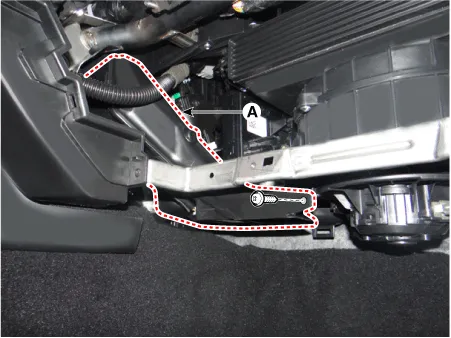
Remove the passenger side shower duct (A) after loosening the screw.
|
| 4. |
Remove the aspirator. |
| 5. |
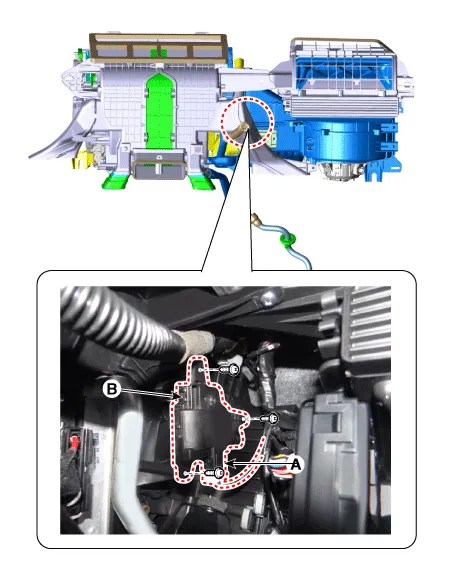
Disconnect the connector (A) and then remove the auto defogging actuator (B) after loosening the screws.
|
| 6. |
Install in the reverse order of removal.Heating, Ventilation And Air Conditioning |


Other information:
Kia Stinger (CK) 2018-2023 Service Manual: Front Door Outside Handle
Components and components location Component Location 1. Front door outside handle Repair procedures Replacement Put on gloves to protect your hands. • When prying with a flat-tip screwdriver or using a prying trim tool, wrap protective tap around the tool and related parts to prevent damage.Service data Service Data Items Inner side Outer side Front driveshaft Joint type HUJ#26 WTJ#24 Max. permissible angle 28° 54° Rear driveshaft Joint type CGJ#26 CGJ#26 Max.Categories
- Manuals Home
- Kia Stinger Owners Manual
- Kia Stinger Service Manual
- New on site
- Most important about car
