
Kia Stinger CK: Front Seat / Front Seat Frame Assembly
Components and components location
| Component Location |

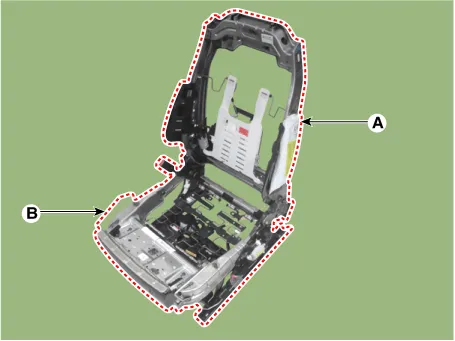
| 1. Front seat back frame assembly
|
2. Front seat cushion frame assembly
|
Repair procedures
| Replacement |
|

|

| 1. |
Remove the front seat back cover. (Refer to Front Seat - "Front Seat Back Cover") |
| 2. |
Remove the front seat cushion cover. (Refer to Front Seat - "Front Seat Cushion Cover") |
| 3. |
Remove the lumbar support assembly. (Refer to Body Electrical System - "Lumbar Support Unit") |
| 4. |
After loosening the mounting bolts, disconnect the front seat back frame assembly (A) and front seat cushion frame assembly (B).
|
| 5. |
Install in the reverse order of removal. |


Other information:
Kia Stinger (CK) 2018-2023 Service Manual: Roof Trim Assembly
Components and components location Component Location 1. Roof Trim Assembly Repair procedures Replacement Put on gloves to protect your hands. • Use a plastic panel removal tool to remove interior trim pieces without marring the surface.Kia Stinger (CK) 2018-2023 Service Manual: Automatic climate control system
■ Front seat ■ Rear seat 1. Driver’s temperature control knob 2. AUTO (automatic control) button 3. Front windshield defroster button 4. Rear window/mirrors defroster button 5. Air conditioning button 6. Air intake control buttons 7. OFF button 8. Fan speed control buttons 9. Mode selection button 10. Passenger's temperature control knob 11.Categories
- Manuals Home
- Kia Stinger Owners Manual
- Kia Stinger Service Manual
- New on site
- Most important about car
