Kia Stinger CK: ISG (Idle Stop & Go) System / ISG OFF switch

Description and operation
Description

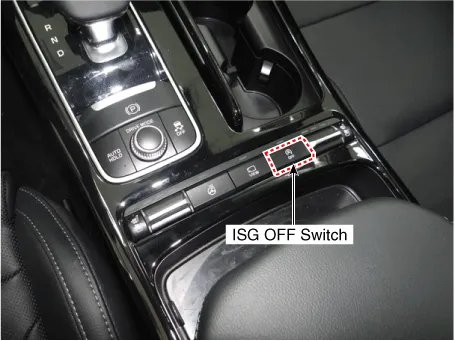
The ISG OFF switch on the floor console can be used to deactivate the ISG function.

Repair procedures
Removal
  

Put on gloves to protect your hands.

  
•

When prying with a flat-tip screwdriver or use a prying trim tool, wrap it with protective tape, and apply protective tape around the related parts, to prevent damage.

•

Use a plastic panel removal tool to remove interior trim pieces to protect from marring the surface.

•

Take care not to bend or scratch the trim and panels.

1.

Disconnect the negative (-) battery terminal.

2.

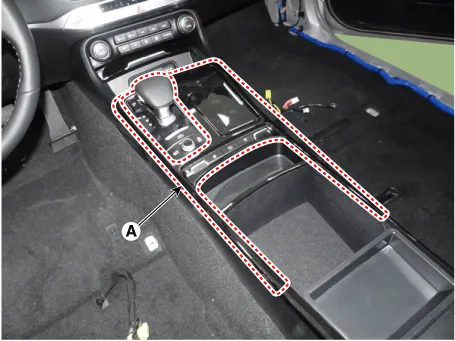
Remvoe the console upper complete (A) by using a remover.

3.

Disconnect the connectors (A) from the console upper complete.

4.

Remove the connector (A) from the console floor switch complete.

5.

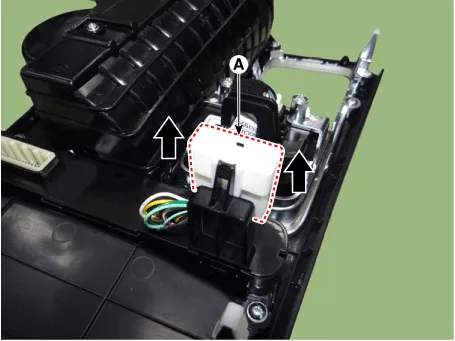
Remove the console floor switch complete (A) after loosening the mounting screws.

Installation
1.

Install the console floor switch complete.

2.

Install the connector from the console floor switch complete.

3.

Connect the connectors from the console upper complete.

4.

Install the console upper complete.

5.

Connect the negative (-) battery terminal.

  
•

Make sure that the connectors are plugged in properly.

•

Check the AVM system for normal operation.

Other information:

Kia Stinger (CK) 2018-2023 Service Manual: Head Up Display (HUD)

Description The head up display is a transparent display which projects a shadow of some information of the instrument cluster and navigation on the windshield glass. The head up display image on the windshield glass may not be visible when: - Sitting posture prevents visibility. - Wearing polarized sunglasses. - There is an object on the cover of the head up display.

Kia Stinger (CK) 2018-2023 Service Manual: Compass function

The Compass can be turned ON and OFF and will remember the last state when the ignition is cycled. To turn the display feature ON/OFF: 1. Press and release the button to turn the display feature OFF. 2. Press and release the button again to turn the display back ON. Additional options can be set with press and hold sequences of the button and are detailed below.

Categories

 
Copyright © 2026 www.kstinger.com 0.0145