
Kia Stinger CK: Rear Bumper / Rear Bumper Beam Assembly
Kia Stinger (CK) 2018-2023 Service Manual / Front Seat Belt / Rear Bumper / Rear Bumper Beam Assembly
Components and components location
| Component Location |

| 1. Rear bumper beam assembly
|
Repair procedures
| Replacement |
Put on gloves to protect your hands. |

|

| 1. |
Remove the rear bumper cover. (Refer to Rear Bumper - "Rear Bumper Assembly") |
| 2. |
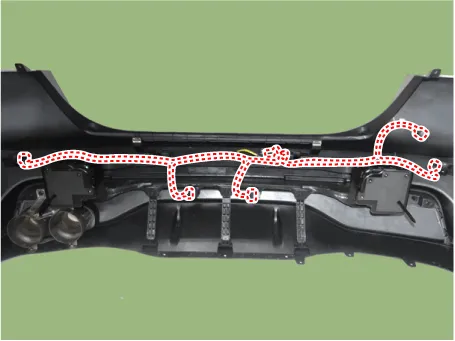
Disconnect the rear bumper beam mounting wiring harness.
|
| 3. |
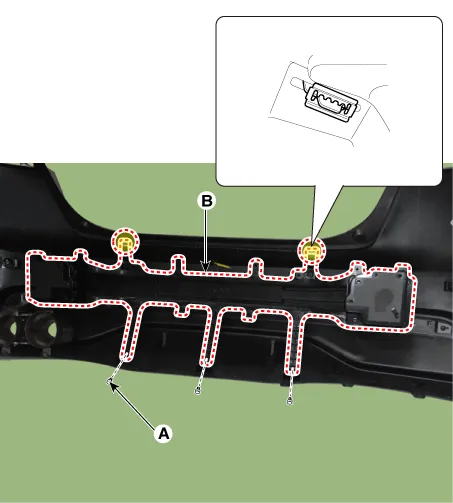
Remove the mounting clips (A), then remove the rear bumper beam assembly (B).
|
| 4. |
Install in the reverse order of removal.
|


Other information:
Kia Stinger (CK) 2018-2023 Service Manual: Parking Switch
Specifications Specifications Specifications Item Specification Output type PWM (S1, S2), ON/OFF (Ps, Ns) Power supply (V) 5 (S1, S2), 12 (Ps, Ns) Signal code table Signal P Not P S1 5 V 0 S2 0 5 V Ps 12 V 0 Ns 0 12 V Components and components location Components Location 1.Kia Stinger (CK) 2018-2023 Service Manual: Rear Shock Absorber
Components and components location Components 1. Lock nut 2. Rear insulator 3. Bumper stopper 4. Dust cover 5. Shock absorber Repair procedures Removal 1. Remove wheel nuts, rear wheel and tire (A) from hub. Tightening torque : 107.9 - 127.Categories
- Manuals Home
- Kia Stinger Owners Manual
- Kia Stinger Service Manual
- New on site
- Most important about car

Copyright © 2026 www.kstinger.com 0.011