
Kia Stinger CK: Fuel Delivery System / Low Pressure Fuel Pump
Repair procedures
| Inspection |
[Fuel sender]
| 1. |
Switch "OFF" the ignition and disconnect the negative (-) battery terminal. |
| 2. |
Remove the fuel pump assembly. |
| 3. |
Using an ohmmeter, measure the resistance between terminals 1 and 2 of sender connector (A) at each float level.
|


| 4. |
Also check that the resistance changes smoothly when the float moves from "E" to "F".
|
| Removal |
| 1. |
Release the residual pressure in fuel line. (Refer to the Fuel Delivery System - "Release Residual Pressure in Fuel Line") |
| 2. |
Switch "OFF" the ignition and disconnect the negative (-) battery terminal. |
| 3. |
Remove the rear seat cushion. (Refer to Body - "Rear Seat Assembly") |
| 4. |
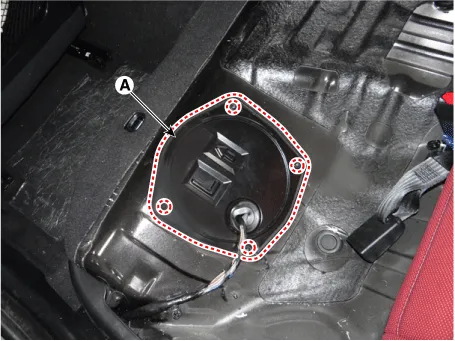
Remove the fuel pump service cover (A) after loosening the mounting screws.
|
| 5. |
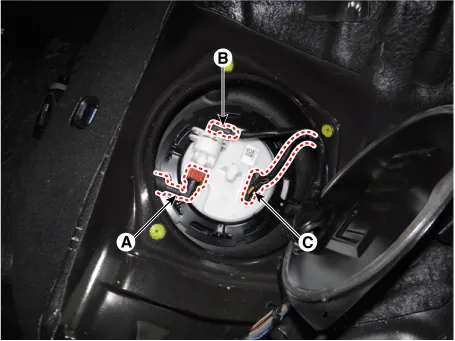
Disconnect the fuel feed quick-connector (A). |
| 6. |
Disconnect the fuel pressure sensor connector (B). |
| 7. |
Disconnect the fuel pump connector (C).
|
| 8. |
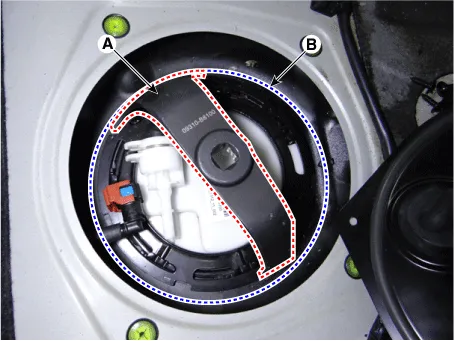
Remove the locking ring (A) by using the special service tool (B) [No.: 09310-B8100].
|
| 9. |
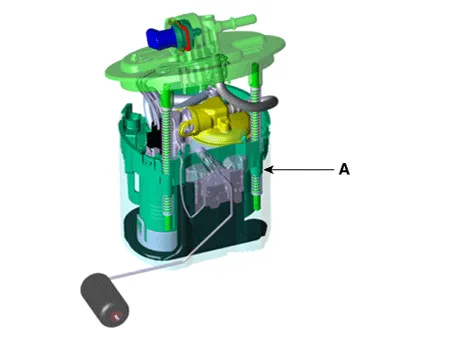
Remove the fuel pump (A).
|
| Installation |
| 1. |
Install in the reverse order of removal. |


Other information:
Kia Stinger (CK) 2018-2023 Service Manual: Smart Cruise Control (Stop & Go) (SCC) Switch
Components and components location Components 1. Left Remote Control Switch (Audio + Bluetooth + Voice) 2. Right Remote Control Switch (Trip Computer + ACC + SCC) Schematic diagrams Circuit Diagram [Audio + Bluetooth + Voice] [Trip + ACC] [Trip + ACC + SCC] Repair procedures Inspection 1.Kia Stinger (CK) 2018-2023 Service Manual: Tire terminology and definitions
Air Pressure: The amount of air inside the tire pressing outward on the tire. Air pressure is expressed in kilopascal (kPa) or pounds per square inch (psi). Accessory Weight: This means the combined weight of optional accessories. Some examples of optional accessories are, automatic transaxle, power seats, and air conditioning. Aspect Ratio: The relationship of a tire's height to its width.Categories
- Manuals Home
- Kia Stinger Owners Manual
- Kia Stinger Service Manual
- New on site
- Most important about car
